BambooHR / Case study 01
Recognition & Rewards
Powerful features for admins. Effortless engagement for everyone else.
Explore the interactive prototype ↗
The challenge
When starting work on Recognition & Rewards, I had to consider both sides of the experience. Admins needed a clear way to set-up the program and keep it running with granular controls and easily accessed analytics. For employees, the challenge was participation: how could we make recognition a natural part of their day instead of another mundane task to remember?
Context
Why it mattered.
Recognition was one of our most-requested features and a natural extension of BambooHR’s “better together” story. As the first HRIS to offer it natively, our goal went beyond parity; we set out to create an exceptional experience for employees and admins.
My role
Where I led.
I led product design for the admin setup and employee recognition flow, including the point-allocation model. I also helped shape the Slack integration and suggestion agent, working with product, engineering, research, and customers through launch.
PART ONE / THE ADMIN EXPERIENCE
Making a complex setup effortless.
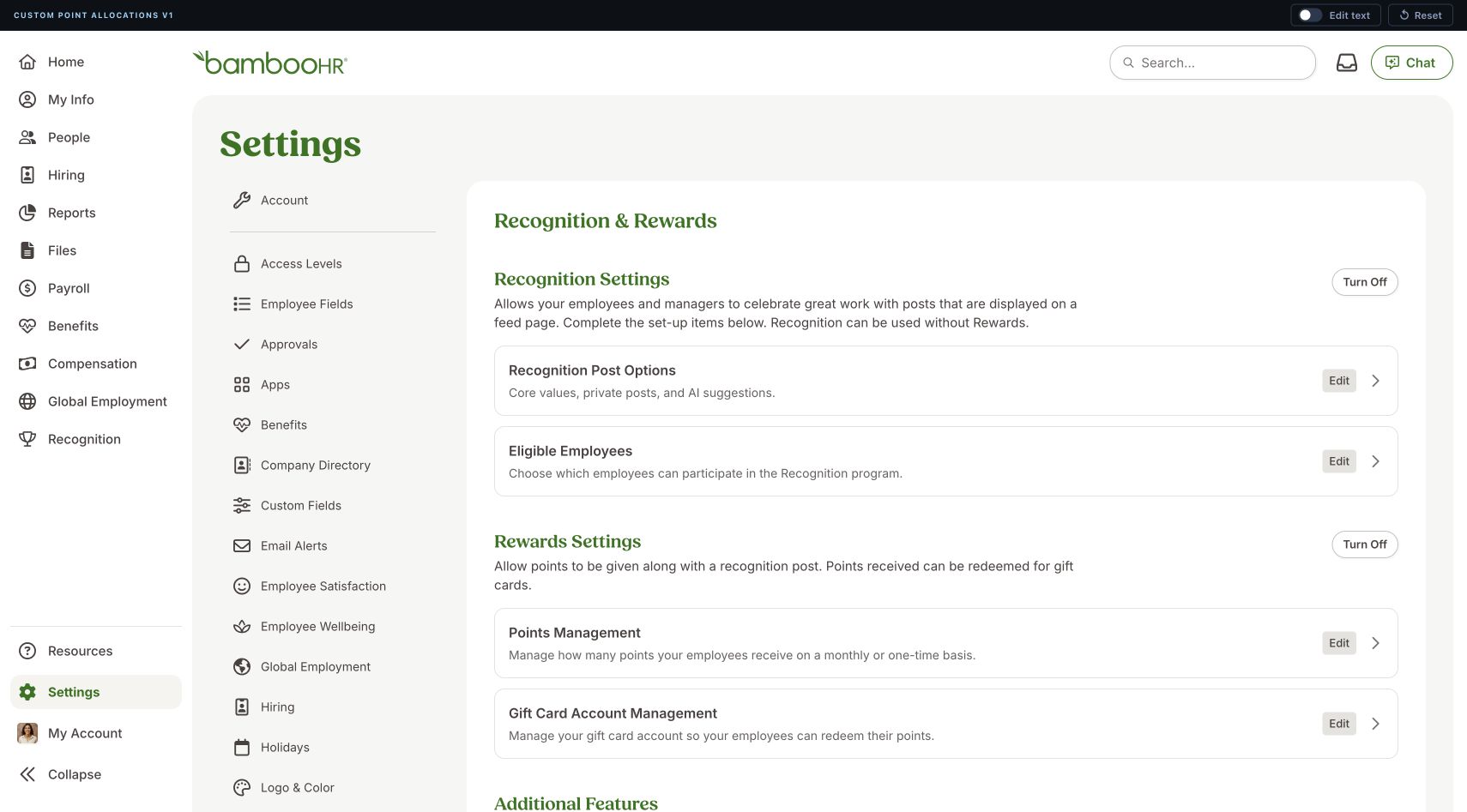
I couldn’t remove all of the complexity from the admin experience, but I could make it easier to navigate. I organized the system around clear decisions, introduced complexity only when it was needed, and showed admins what would happen before they committed to a change.
The approach
Turn evidence into direction.
- 01
Create a map before exposing controls
I organized the Admin hub into Recognition Settings, Rewards Settings, and Additional Features. Short descriptions and a single Edit or Set Up action made the system scannable while clarifying that recognition could operate without rewards.
- 02
Reveal complexity when it becomes relevant
Focused pages separate post behavior from eligibility, while sensible defaults include active employees and ask Admins to manage only exceptions. Point-allocation forms adapt after an Admin chooses a group, managers, or individuals.
- 03
Make consequences visible
Allocation summaries expose the affected population, recurring point total, and estimated cash value. Timing notes explain when changes take effect, helping Admins understand what will happen before they commit.
PART TWO / THE EMPLOYEE EXPERIENCE
Meet employees where they work.
Recognition needed to fit into the workday, not ask employees to visit another destination. We focused on reaching people where they already worked and making each post easier to begin.
THE NEXT BET
The agent has entered the chat.
Email set the baseline. Slack brought an early lift by putting reminders and posting into the flow of work, but people still had to decide whom to recognize and what to say. We believed an agent could help them turn that intention into a personal message.
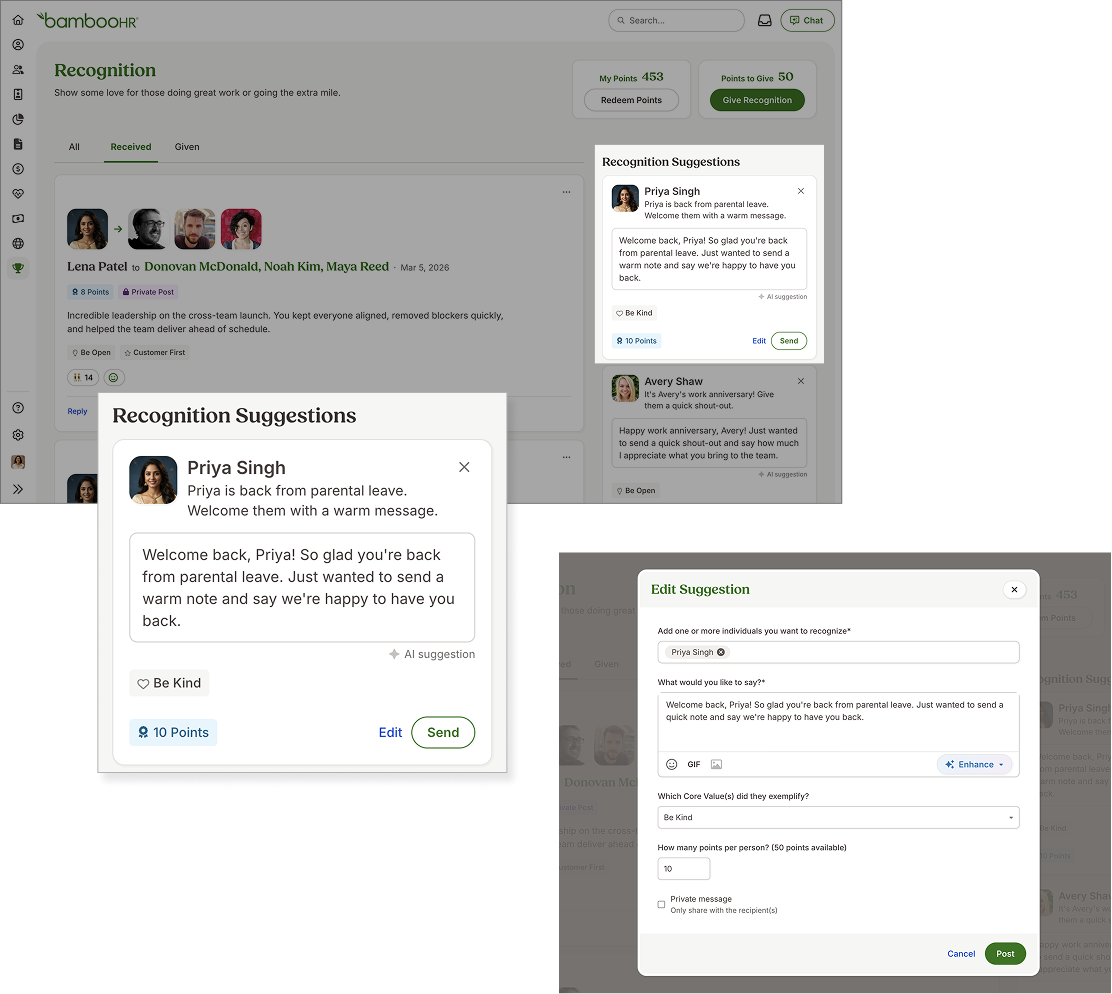
The agent suggested a person, reason, and editable message. Employees kept control of values, points, privacy, and sending. Suggestions launched across Slack, email, and the platform; recognition could also be sent directly from Slack.
The release sequence
From reminders to a useful starting point.
-
Month 01
Email Only
The initial launch used email notifications only. There was no Slack integration or suggestion agent.
About 800 signed-up users before Slack
Baseline
-
Month 02
Slack Integration
Reminders reached employees in Slack, where they could send recognition without leaving their work.
About 4,000 signed-up users before the agent
+14% posts
-
Month 03
Agent Release
Editable suggestions launched across Slack, email, and the platform at the same time.
About 8,000 signed-up users when I left
+56% posts
Both increases compare recognition posts with the original email-only baseline, adjusted for user growth. The 56% is total, not additive to 14%. Each phase lasted roughly a month. Microsoft Teams and mobile support remained on the 2027 roadmap.